CLI Reference
This page summarizes the main command-line tools provided by epica. The package installs both epa and epica; this page uses epa in examples, but the two commands are interchangeable.
Command Overview
Core pipeline:
epaorepica: run the full alignment and evaluation pipeline
Trajectory and metric tools:
epa_traj: inspect, synchronize, align, transform, plot, and export trajectoriesepa_ape: compute absolute pose error metricsepa_rpe: compute relative pose error metricsepa_res: compare result bundles, run directories, or metrics files
Utilities:
epa_config: manage reusable global and tool-level defaultsepa_fig: re-render plots from serialized plot bundles
Benchmark tools are documented separately in Benchmark Workflow.
Shared Concepts
Supported Formats
Most tools support these input formats:
autocsveuroctumkittibagbag2mcap
For ROS log formats, install:
python -m pip install "epica[ros]"
Topics for ROS Inputs
For ROS logs, you usually need to provide a topic:
epa /path/to/run.bag /path/to/run.bag \
  --gt-format bag --gt-topic /vicon/pose \
  --est-format bag --est-topic /odom
For epa_traj, you can also encode the topic inside each trajectory spec:
epa_traj --format bag /path/to/run.bag::/vicon/pose /path/to/run.bag::/odom --plot
Time Association
Several tools match trajectories by timestamp before computing metrics.
Key options:
t_offset: shifts estimation timestamps before matchingt_max_diff: maximum residual timestamp difference allowed for a valid matcht_startandt_end: crop trajectories to a time window before evaluation
Guidelines:
- Use smaller
t_max_diffvalues when timestamps are already well aligned - Increase
t_max_diffonly when you know the logs are sparse or noisy - Use
t_offsetwhen one trajectory is consistently ahead of or behind the other
Help Commands
epa --help
epa_traj --help
epa_ape --help
epa_rpe --help
epa_res --help
epa_config --help
epa / epica
epa / epica is the main entry point. It loads a reference trajectory and an estimated trajectory, runs the alignment pipeline, computes metrics, and writes plots, reports, and interactive_report.html into a new run directory.
Common options:
- positional
<gt_file>or--gt: reference trajectory path --gt-format: reference format--gt-topic: reference topic for ROS logs- positional
<est_file>or--est: estimation trajectory path --est-format: estimation format--est-topic: estimation topic for ROS logs--mode {se3,posyaw,sim3}: public evaluation mode--t-max-diff: maximum timestamp association gap--t-offset: constant offset applied to estimation timestamps before sync--plotand--no-plot: enable or disable metric plot generation--debug: generate extra diagnostic figures, including raw/intermediate/final trajectory comparison--save-results: write a bundled result zip--save-full-metrics: keep full per-sample APE/RPE arrays inmetrics.json--rerun: enable Rerun logging
Calibration controls:
--disable-time-offset-calibration: force the calibrated time offset to zero--disable-extrinsic-calibration: use identity/zero sensor extrinsics--disable-calibration: disable both calibration stages--disable-identity-safeguard: disable the shared extrinsic solver's identity-candidate comparison (the safeguard is on by default)
The shared extrinsic/world-alignment stage also checks rotation observability
and compares calibrated candidates with genuine identity extrinsics (R = I,
t = 0). The observability threshold is a weakest/strongest rotational
information eigenvalue ratio of 0.1, evaluated on the final rotation inliers
with capped/robust weights. Both trajectories' excitation and the matched-fit
curvature must pass. Two nonparallel rotation axes can pass; single-axis motion
cannot. This is a conditioning heuristic, not a statistical confidence bound.
Weakly observable rotation is now refitted with its unsupported log-rotation components fixed to zero. The weakest-conditioned information matrix supplies the reference-frame eigenvectors; components below the same 0.1 eigenvalue-ratio threshold are constrained. The supported components minimize the weighted relative-rotation-vector error. Original final pair masks and weights are frozen, and the same mask is reused for translation. Axis-flipped alternatives are not generated for constrained fits because they can violate the constraint. This is an identity-centered prior: genuine extrinsics in weak directions are suppressed, and drift may still bias the supported components.
Insufficient excitation, no supported subspace, or numerical failure still
falls back to identity without fitting translation. Otherwise, candidates must
not worsen positional RMSE on the same full associated solve set, including
poses excluded from their trimmed alignment fits. Tolerance is numerical only
(max(1e-9 m, 1e-9 * identity_RMSE)). Position ties prefer identity unless
orientation RMSE improves. The fit and comparison reuse the solve data; this is
an evaluation safeguard, not independent calibration validation. Conservative
fallback can reject genuine extrinsics when motion is insufficient or poses are
inconsistent. Sim3's separate optional correction/acceptance path is unchanged.
Logs and diagnostics expose extrinsic_selection_reason,
extrinsic_identity_selected, extrinsic_rotation_information_ratio, and the
identity/selected positional RMSE. Explicit disable flags remain authoritative.
Constraint diagnostics include extrinsic_rotation_constraint_success,
extrinsic_rotation_constraint_dimension, the information source, and original
and constrained rotation angles. extrinsic_rotation_observable still describes
the original unconstrained fit. For controlled internal evaluations,
_solve_extrinsic_and_world_alignment(compare_identity_candidate=False) bypasses
the positional identity comparison, but not insufficient-data/numerical safety
fallbacks. Public CLI behavior retains the identity comparison by default.
Use --disable-identity-safeguard with epa, or
--epa-disable-identity-safeguard with the OV-compatible evaluation commands,
to bypass it. This can accept calibration that worsens positional ATE.
Observability checks, weak-direction constraints, and insufficient-data/numerical
safety fallbacks remain active. Disabling extrinsic calibration still forces
identity/zero extrinsics, regardless of this option. Sim3's separate acceptance
check is unaffected by this shared-solver option.
The OV-compatible commands expose the same controls with an --epa- prefix:
--epa-disable-time-offset-calibration, --epa-disable-extrinsic-calibration,
and --epa-disable-calibration. Shorter aliases ending in --time-offset and
--extrinsic are also accepted.
Minimal example:
epa example_data/example_groundtruth.csv example_data/example_estimation.txt
With result bundle export:
epa example_data/example_groundtruth.csv example_data/example_estimation.txt \
  --save-results outputs/results/run_a.zip
EPA Alignment Modes
Use --mode to select the public alignment mode reported by the main pipeline.
The current public EPA modes are:
| mode | transform | scale | intended use |
|---|---|---|---|
se3 |
full 3D rotation + 3D translation | fixed 1.0 |
metric-scale trajectories, especially VIO/odometry where GT and estimate should already share metric scale |
sim3 |
3D rotation + 3D translation + one global scale | estimated | scale-ambiguous visual SLAM / visual odometry cases, for example when GT is metric but the estimate may not be |
posyaw |
yaw-only rotation + 3D translation | fixed 1.0 |
gravity-aligned VIO cases where roll/pitch should be preserved and only global yaw/position should be aligned |
Mode selection rule of thumb:
- Use
se3by default for metric-scale VIO/odometry. - Use
sim3only when the estimate has unknown or unreliable scale. - Use
posyawwhen yaw is the only unobservable global rotation and roll/pitch consistency must remain visible in the metrics.
Compatibility note: older internal aliases such as epa_se3, epa_posyaw, and
epa_sim3 are still accepted by some advanced tools, but new commands and docs
should use only se3, posyaw, and sim3.
Representative one-case commands from the local AlignAnything2 layout:
# se3: metric-scale VIO / odometry
epa \
  --gt /home/yifu/epa_data/AlignAnything2/AlignAnything2/GT/lamaria/cp/R_11_5cp.txt \
  --gt-format tum \
  --est /home/yifu/epa_data/AlignAnything2/AlignAnything2/benchmark/lamaria/cp/pose/rovio/R_11_5cp/rovio_poses.txt \
  --est-format tum \
  --mode se3 \
  --output-root outputs/mode_examples \
  --run-label lamaria_R_11_5cp_rovio_se3
# sim3: scale-ambiguous visual SLAM / visual odometry
epa \
  --gt /home/yifu/epa_data/AlignAnything2/AlignAnything2/GT/aqualoc/archaeo/archaeo1/archaeo_sequence_4.txt \
  --gt-format tum \
  --est /home/yifu/epa_data/AlignAnything2/AlignAnything2/benchmark/archaeo/pose/svo_stereo/archaeo_sequence_4/svo_poses.txt \
  --est-format tum \
  --mode sim3 \
  --output-root outputs/mode_examples \
  --run-label aqualoc_archaeo_sequence_4_svo_stereo_sim3
# posyaw: gravity-aligned VIO, yaw + translation only
epa \
  --gt /home/yifu/epa_data/AlignAnything2/AlignAnything2/GT/euroc_mav/MH_04_difficult.txt \
  --gt-format tum \
  --est /home/yifu/epa_data/AlignAnything2/AlignAnything2/benchmark/euroc_mav/pose/rovio/MH_04_difficult/rovio_poses.txt \
  --est-format tum \
  --mode posyaw \
  --output-root outputs/mode_examples \
  --run-label euroc_mav_MH_04_difficult_rovio_posyaw
Report Outputs
Each run writes Markdown reports (report_en.md, report_zh.md) and a supplementary interactive_report.html.
The default report is user-facing:
- final aligned trajectory plots are emphasized
- raw/intermediate/final comparison figures are hidden unless
--debugis used - clipped/core metric plots are prioritized so outliers do not compress the readable range
- full-scale metric plots remain available in the figure gallery
pose_states.csvexports per-timestamp position, orientation, linear velocity, and angular velocity
Use --debug when you want intermediate-stage figures, especially the raw/intermediate/final trajectory comparison.
Case diagnostics are written into the reports and metrics payload. Tags such as time_alignment_weak, trajectory_jump, scale_or_unit_suspect, and gt_mapping_suspect are warnings to guide inspection. orientation_unstable is also a warning and does not change the translation successful rate.
Optional Rerun inspection flow for the main epa / epica pipeline.
epa_traj
epa_traj is the general trajectory utility. Use it to inspect, synchronize, align, plot, or export trajectories.
Common options:
--format: input format for all trajectories--topic: default topic for bag-style inputs--sync: associate all non-reference trajectories to the reference by timestamp--sync-max-diff: timestamp tolerance for--sync--sync-offset: constant timestamp offset before--sync--align: align non-reference trajectories to the reference--correct-scale: enable scale correction with alignment--ref: reference trajectory label or 1-based index--plot: generate plots--plot-mode: choosexy,xz,yz, orxyz--save-as: export loaded trajectories in another format--out-dir: output directory for exported files or generated outputs
Plot two TUM trajectories:
epa_traj --format tum --plot --plot-mode xz gt.tum est.tum
Synchronize and align to the first trajectory:
epa_traj --format tum --sync --align --ref 1 gt.tum est.tum --plot
Export trajectories as TUM:
epa_traj \
  --format auto \
  --save-as tum \
  --out-dir outputs/traj_exports \
  example_data/example_groundtruth.csv example_data/example_estimation.txt
epa_ape
epa_ape computes absolute pose error between a reference trajectory and an estimated trajectory.
Common options:
--pose_relation: metric relation such astrans_part,rot_part,angle_deg, orfull--align: run SE(3) alignment before evaluation--correct_scale: enable scale correction--align_origin: align the first pose to the reference origin--t_max_diff: timestamp matching tolerance--t_offset: constant timestamp shift before matching--plot: generate metric plots--save_results: export a result zip--serialize_plot: save a reusable plot bundle
Example:
epa_ape tum gt.tum est.tum \
  --pose_relation trans_part \
  --align \
  --t_max_diff 0.02 \
  --plot
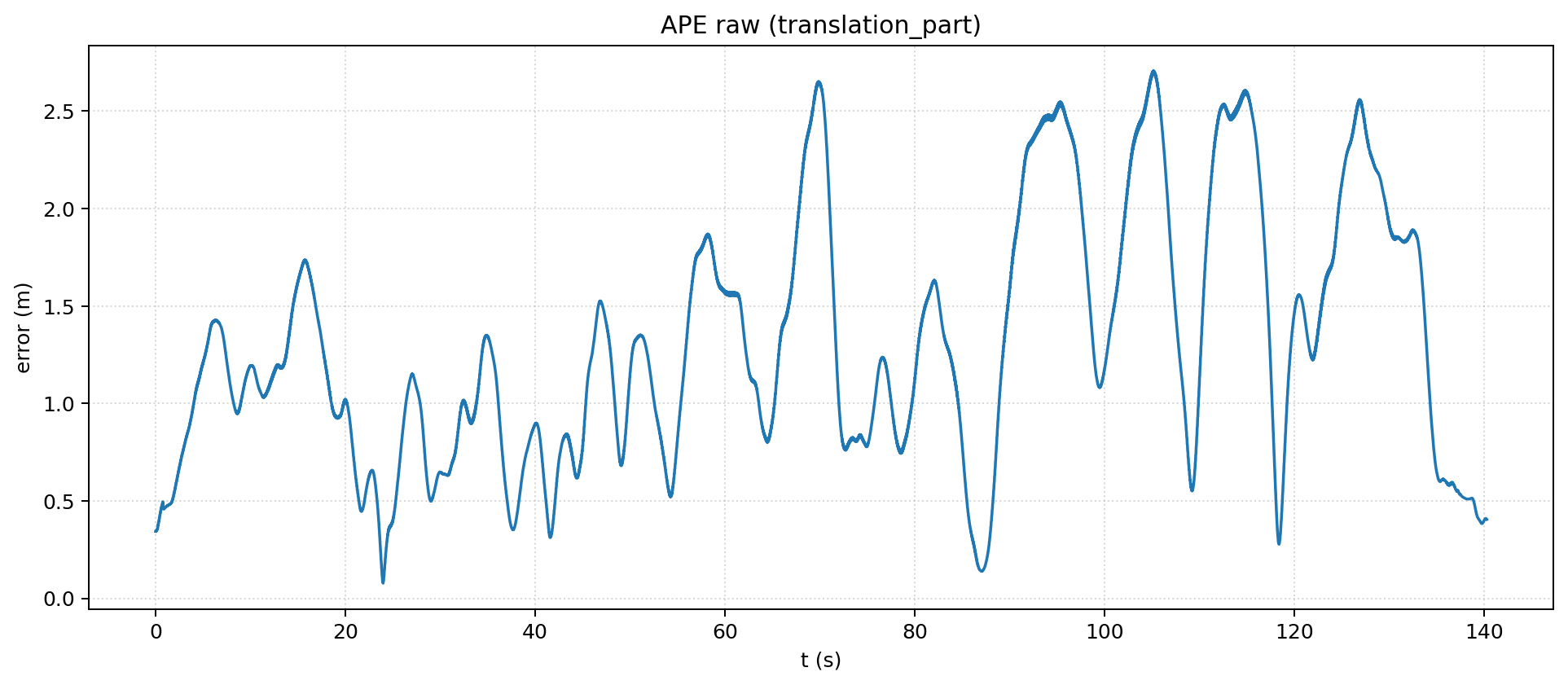
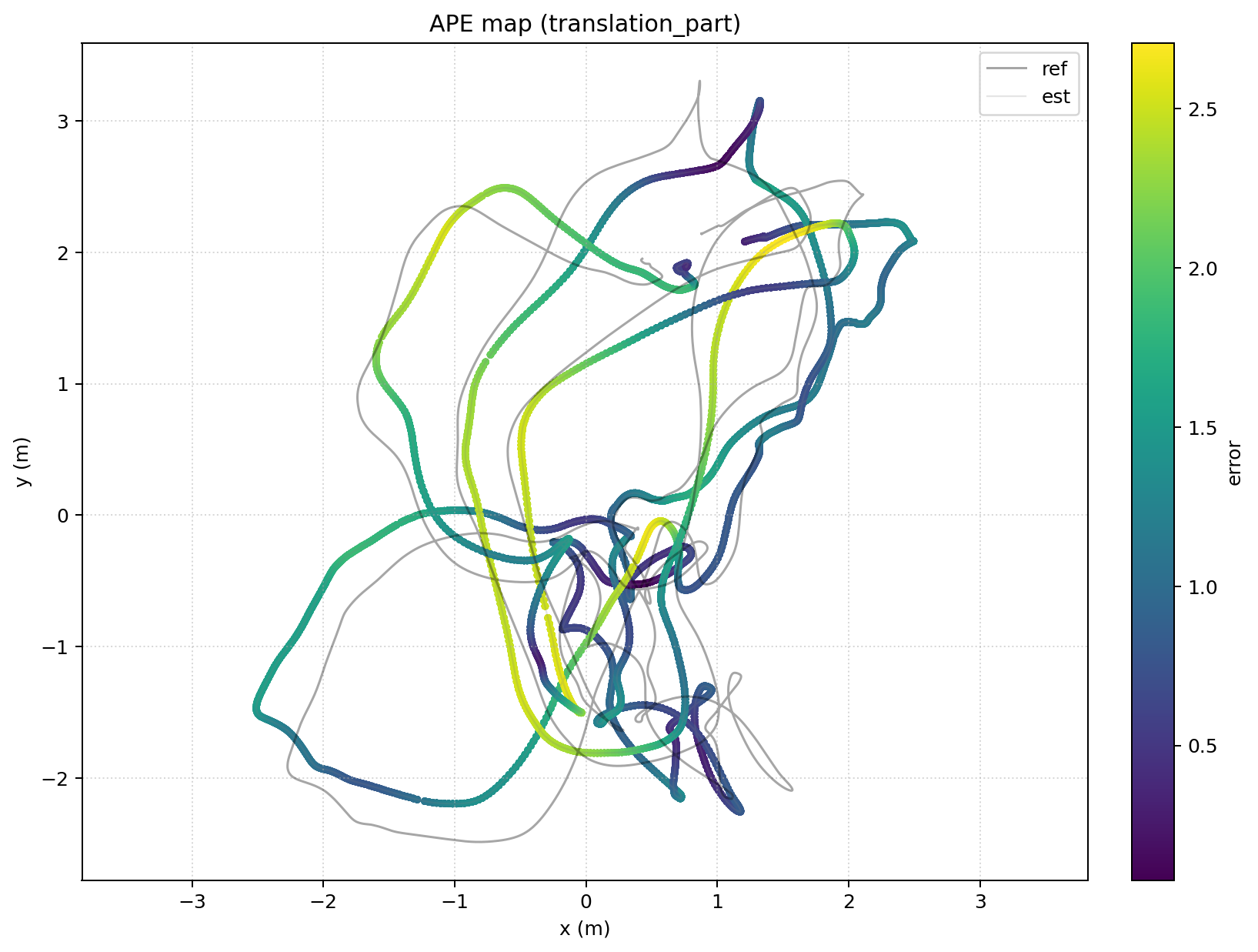
Example epa_ape outputs: raw error curve and map-colored trajectory.
Save a reusable plot bundle:
epa_ape tum gt.tum est.tum \
  --pose_relation trans_part \
  --serialize_plot outputs/ape_plot.json
epa_rpe
epa_rpe computes relative pose error. The key extra concept is delta, which defines the spacing between pose pairs.
Common options:
--pose_relation: metric relation such astrans_part,rot_part, orpoint_distance_error_ratio--delta: separation between pose pairs--delta_unit:ffor frames,mfor meters,dfor degrees,rfor radians,sfor seconds--delta_tol: relative tolerance used in all-pairs mode for non-frame deltas--all_pairs: use all candidate pairs--pairs_from_reference: build RPE pairs from the reference instead of the estimate--align: run SE(3) alignment before evaluation--plot: generate metric plots
Example:
epa_rpe tum gt.tum est.tum \
  --pose_relation trans_part \
  --delta 1 \
  --delta_unit f \
  --all_pairs \
  --align \
  --plot
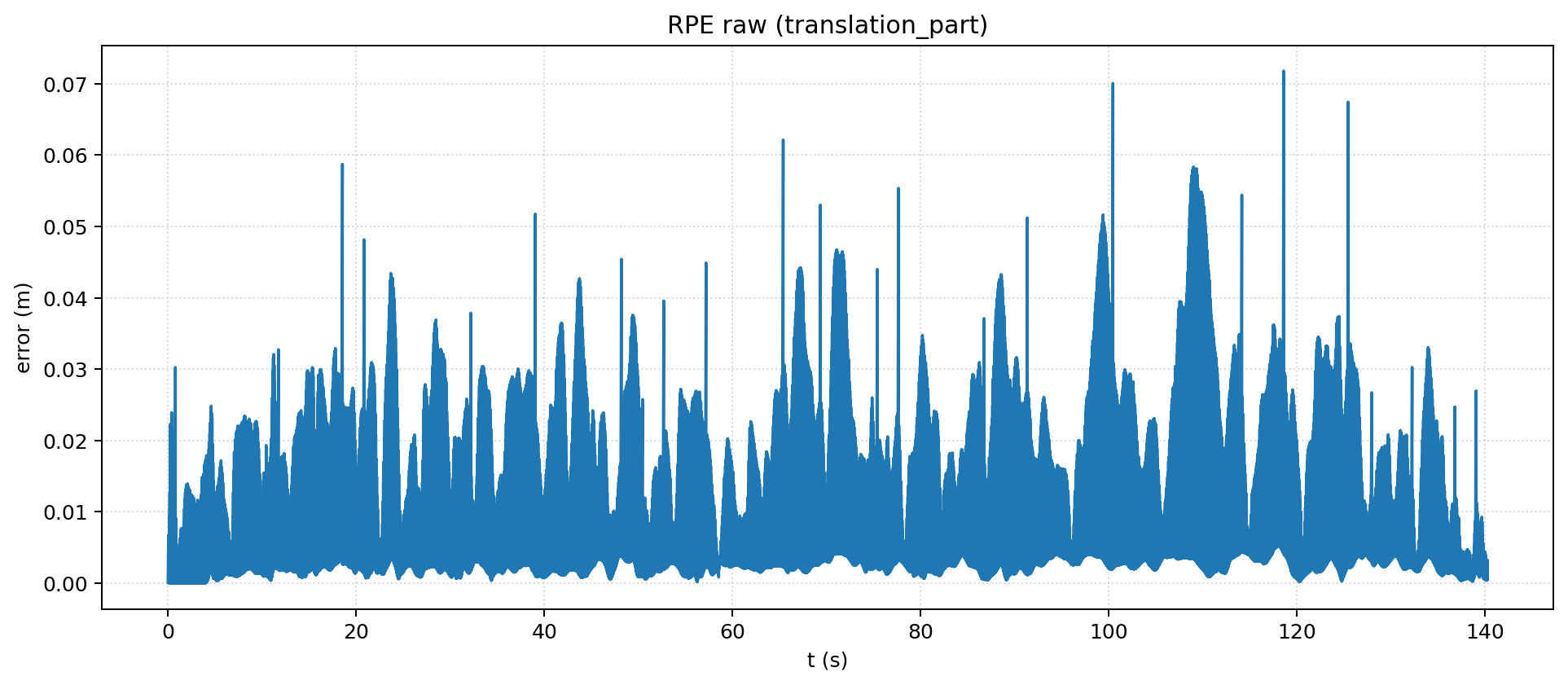
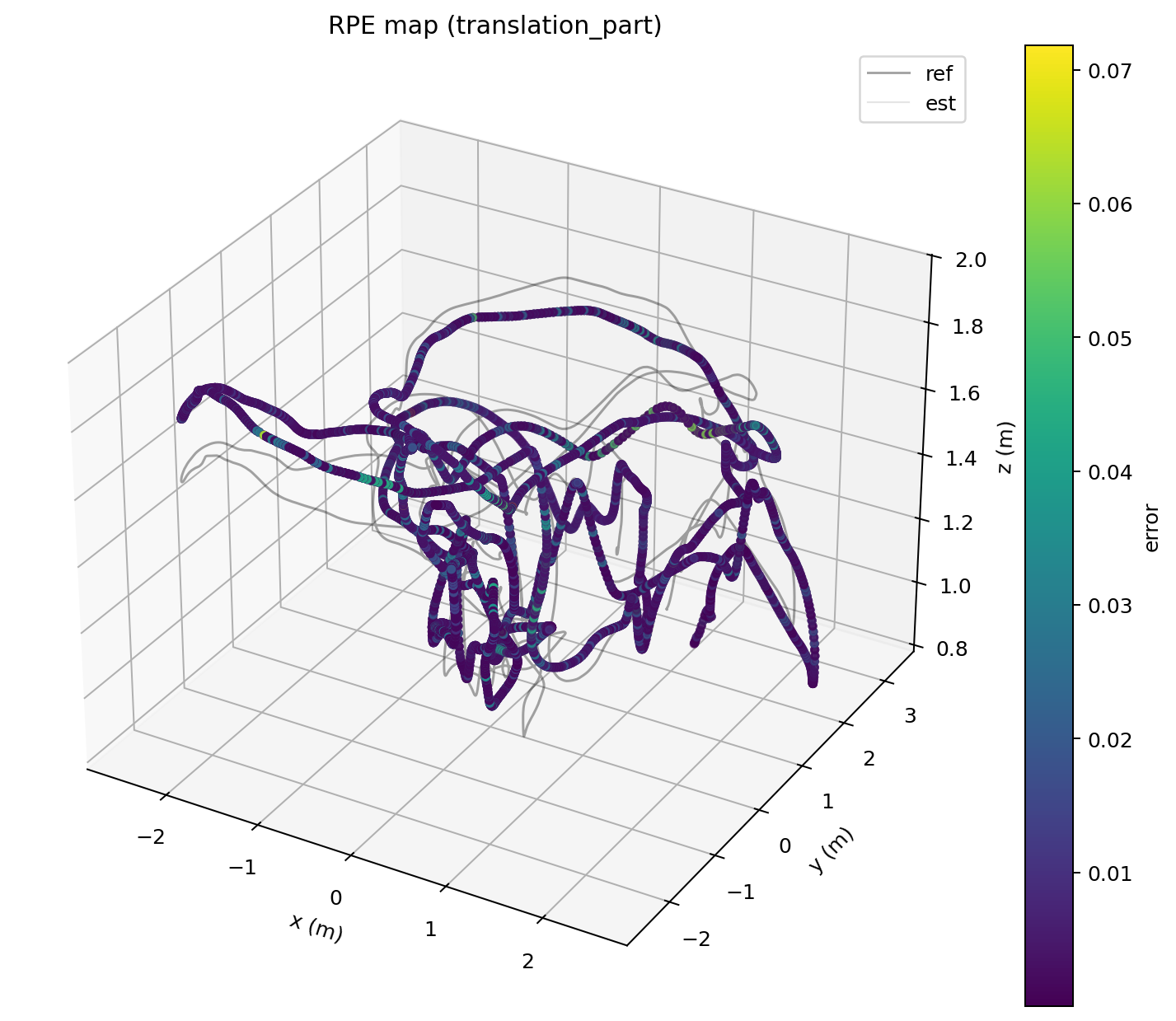
Example epa_rpe outputs: raw relative error curve and map-colored trajectory.
Path-based RPE example:
epa_rpe tum gt.tum est.tum \
  --pose_relation trans_part \
  --delta 1.0 \
  --delta_unit m \
  --all_pairs
Time-based RPE example:
epa_rpe tum gt.tum est.tum \
  --pose_relation trans_part \
  --delta 1.0 \
  --delta_unit s \
  --all_pairs
epa_res
epa_res compares previous evaluation outputs. Each input can be:
- a
.zipresult bundle - a
metrics.jsonfile - a run directory containing
metrics.json
Common options:
--metric: compareape,rpe, orall--stage: selectraw,step2, orstep3--stat: choose the statistic to compare such asrmse,mean, ormedian--plot: generate comparison plots--out-dir: directory for generated outputs--save-plot: export plots--save-table: export a comparison table
Example:
epa_res outputs/results/run_a.zip outputs/results/run_b.zip \
  --metric all \
  --stage step3 \
  --plot \
  --out-dir outputs/res_compare
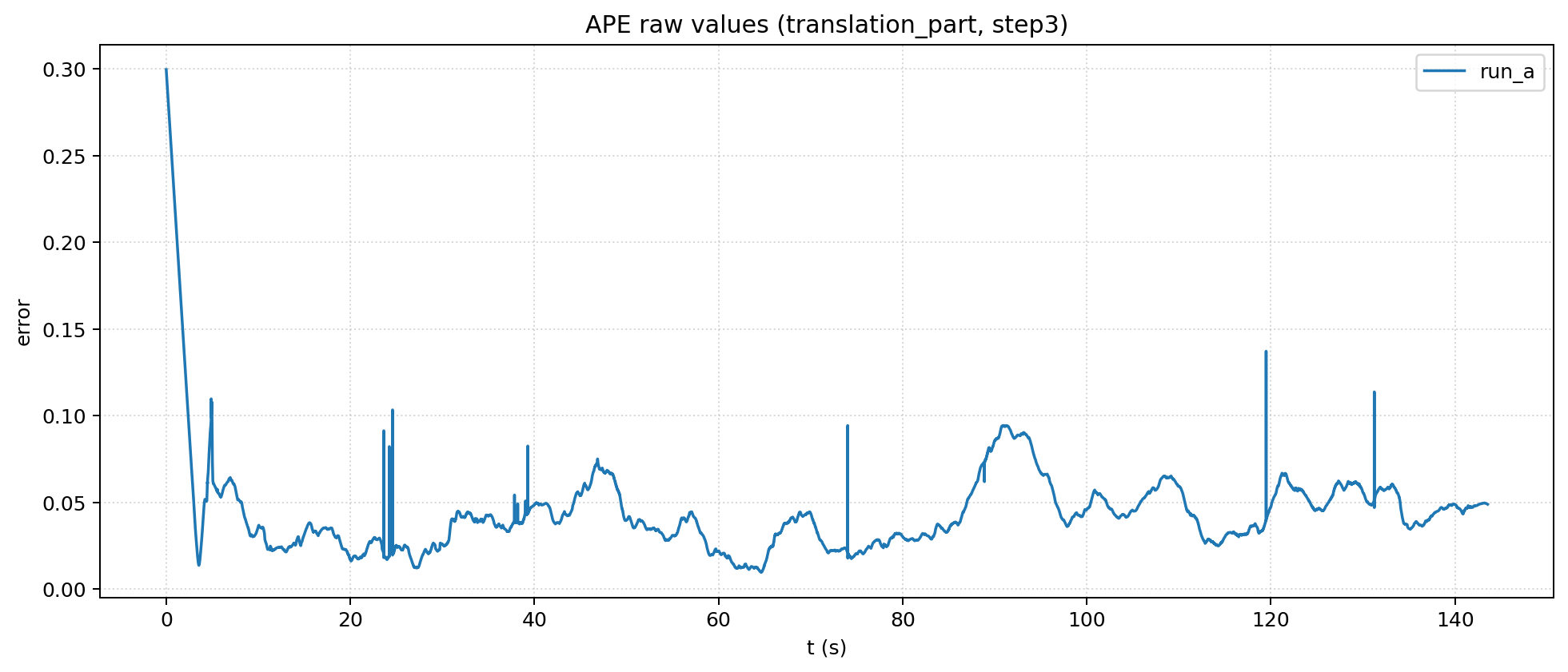
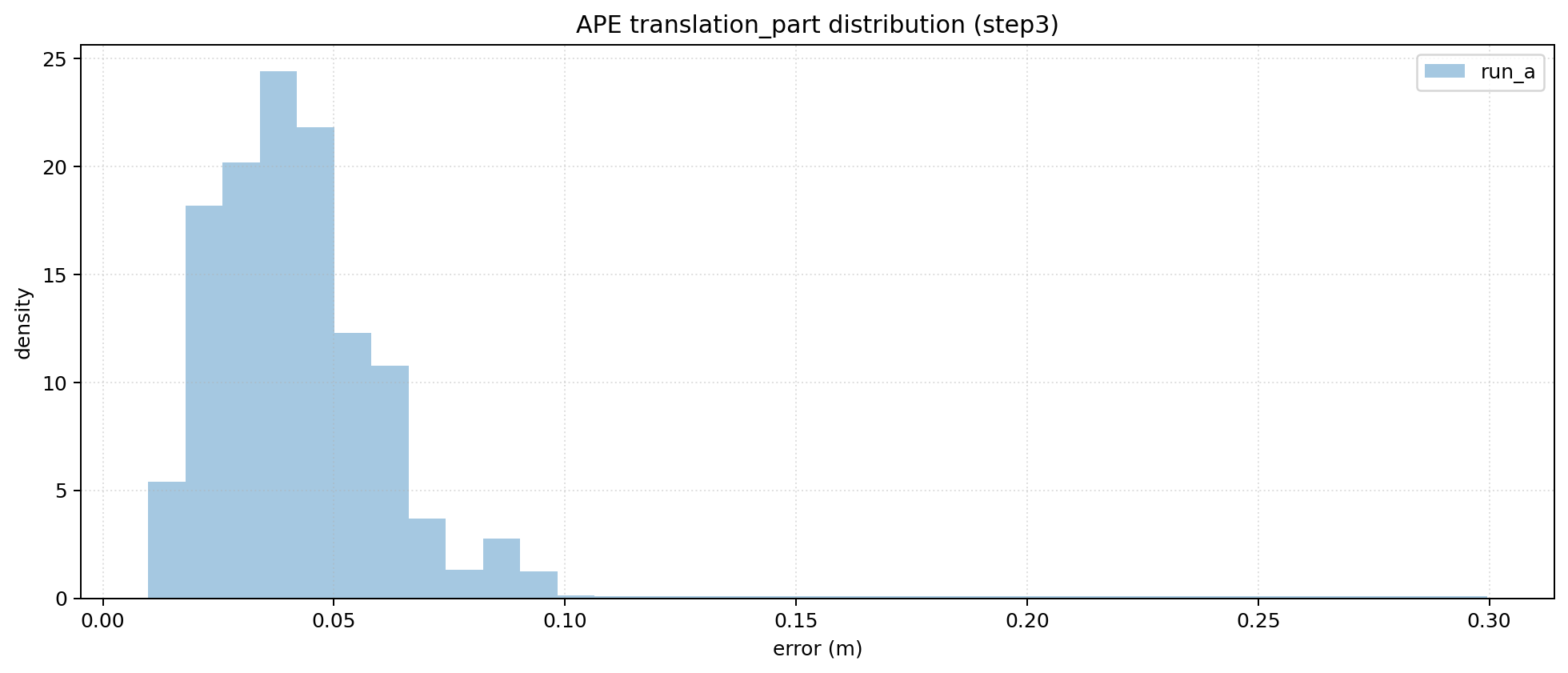
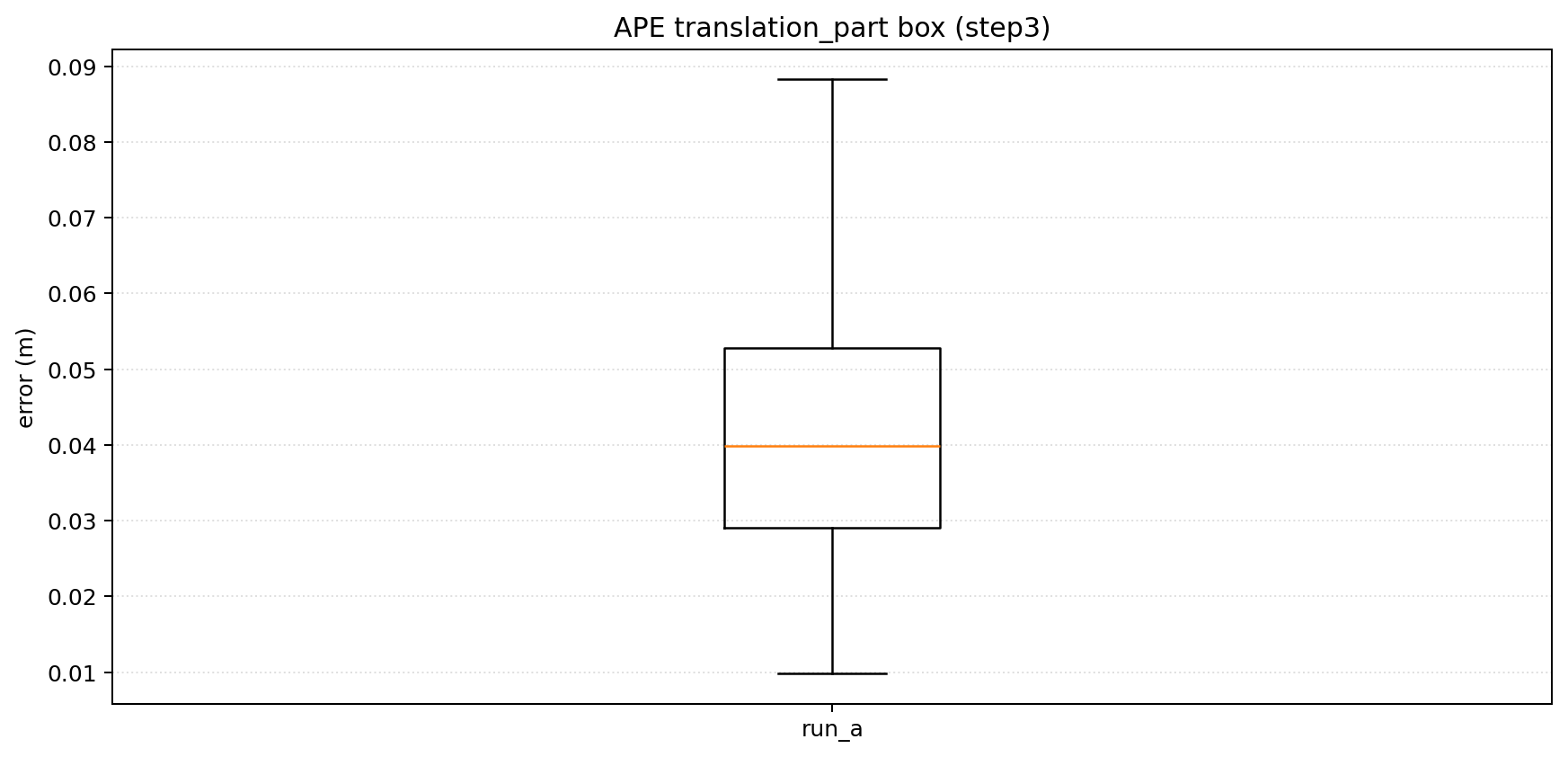
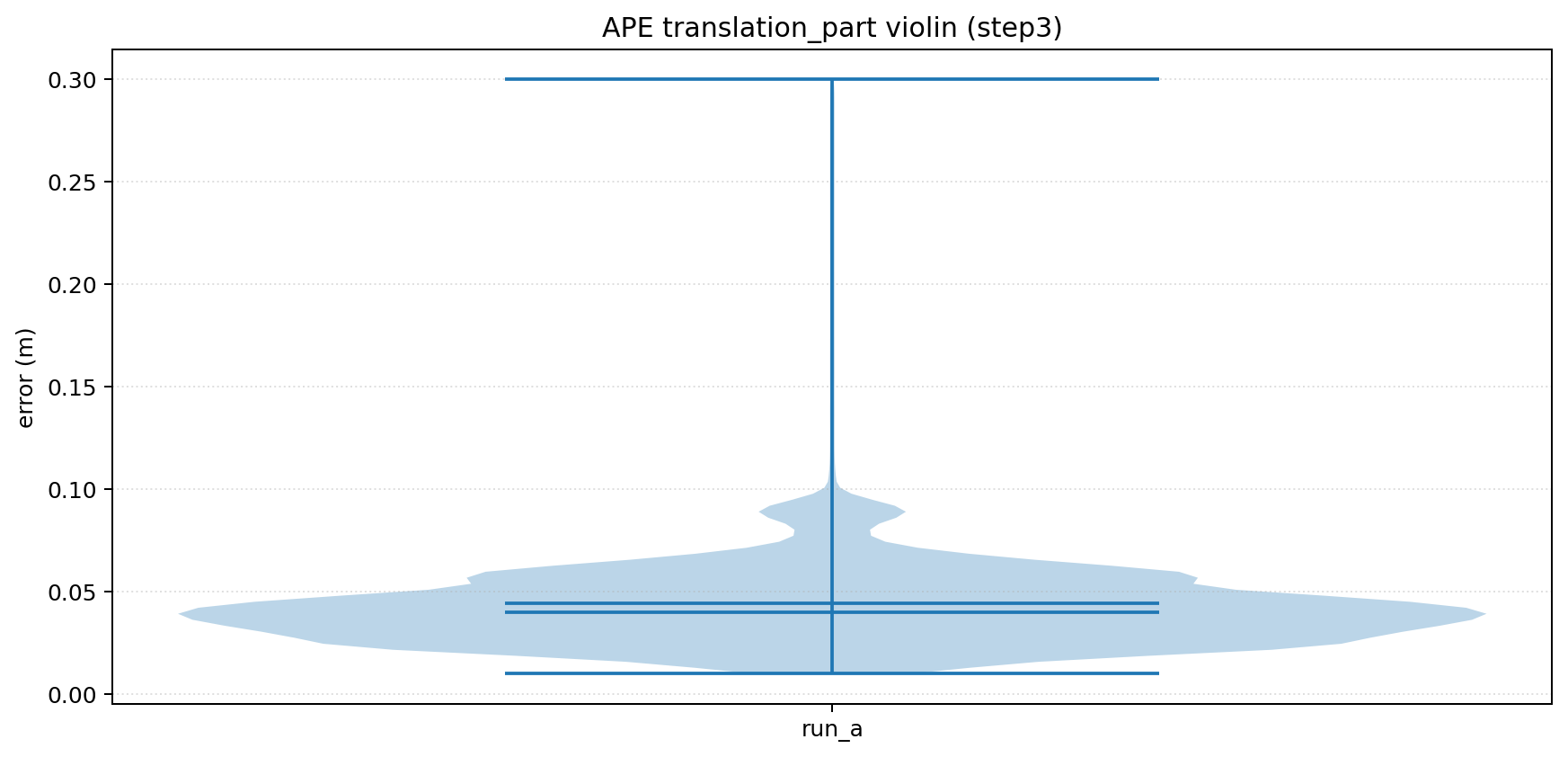
Example epa_res outputs for multi-run comparison.
epa_config
epa_config manages reusable defaults so you do not need to repeat the same flags.
It supports:
- root-level defaults shared across tools
- tool-specific defaults such as
epa_apeorepa_traj - generated template configs for supported tools
Common commands:
Show current settings:
epa_config show
Show effective config for one tool:
epa_config show --tool epa_ape
Set shared defaults:
epa_config set plot false rpe_delta 3
Set tool-specific defaults:
epa_config set --tool epa_ape plot_mode xy t_max_diff 0.05
epa_config set --tool epa_traj plot_mode xyz sync_max_diff 0.01
Generate a template config:
epa_config generate --tool epa_ape --out ape_config.json
epa_fig
epa_fig re-renders serialized plot bundles produced by tools such as epa_ape and epa_rpe.
Common options:
--out_dir: directory for rendered figures--save_plot: custom output name stem--dpi: output resolution--list: list figure names in a bundle without rendering
Example:
epa_fig outputs/ape_plot.json --save_plot outputs/ape_rerender.png
Common Recipes
Run one pair end to end:
epa example_data/example_groundtruth.csv example_data/example_estimation.txt
Inspect alignment before metric evaluation:
epa_traj --format tum --sync --align --ref 1 gt.tum est.tum --plot
Compute APE with explicit sync tolerance:
epa_ape tum gt.tum est.tum \
  --pose_relation trans_part \
  --t_max_diff 0.02 \
  --t_offset 0.0 \
  --plot
Compare two previous runs:
epa_res outputs/results/run_a.zip outputs/results/run_b.zip \
  --metric ape \
  --stage step3 \
  --stat rmse \
  --plot
Config Priority
All core tools support --config <file.json>.
Priority order:
- values loaded from
--config - values passed on the command line
- defaults stored through
epa_config